Progressive web apps(Pwa) are web apps that use the latest web standards to deliver a native-like user experience. They combine what we love most about the web and what we love about native apps. No installation is required, loading time is quite short and the app is accessible from an icon on the home screen.
So what features Progressive Web Apps provide?
Progressive web apps combine a native user experience with the advantages of the web apps:
Discoverability: In fact, progressive web apps are the websites themselves, thus they are indexed by search engines.
Easy updating: New content and updates of your progressive web app will be downloaded instantly when you launch it.
Security: Since every network request will be processed by service workers, progressive web apps should be hosted over HTTPS to prevent security issues.
User experience: Progressive web apps offer a native-like experience and performance with minimal page refreshes. In addition, just like native apps, they can be added to the home screen.
Responsive design: A progressive web app will run smoothly on a smartphone, tablet and desktop as well.
Linkable: Progressive web apps can be shared like any other link to a website.
PWAIncludesHardware access like
geolocation — supported in the vast majority of browsers
camera and microphone via the getUserMedia/Stream and the upcoming MediaStream Image Capture APIs
device vibration
screen orientation and accelerometer access, including compass and gyroscope
battery status
Upcoming hardware access
These features are being implemented or already work in some browsers:
Bluetooth via Web Bluetooth API
NFC
ambient light sensor (works in Firefox 48+)
proximity sensor (works in Firefox 48+)
accelerometer, magnetometer and gyroscope sensor access
hardware-powered shape detection API
Traditionally native features that PWAs can also use
push notifications
working offline
adding an icon to the home screen
being installed into Android (i.e. in the apps drawer and in Settings)
receiving intents
launching in full-screen
clipboard access
persistent auto-login using the Credentials Manager API
hardware-accelerated 2D/3D graphics using CSS3,
HTML5 Canvas or WebGL — check some of theHTML5 Canvas demos, WebGL sites or the three.js library. Game engine performance in WebGL is close to native.
accessing the filesystem (Chrome and Opera) and reading user-selected files in any browser
really slick, smooth UIs with 60 fps animations
These features cover a lot of use cases, and many popular native apps nowadays could be rewritten as PWAs. Take Slack, for example. Its open source alternative, Rocket.Chat, is building a PWA version. For more PWA demos, click here .
While PWA capabilities are rapidly evolving, there are still somethings you can’t do yet.
Native Android features that PWAs currently lack
contacts, calendar and browser bookmarks access (though lack of access to these could be viewed as a feature by privacy-conscious users)
alarms
telephony features — intercept SMSes or calls, send SMS/MMS, get the user’s phone number, read voice mail, make phone calls without the Dialer dialog
low-level access to some hardware features and sensors: flashlight, atmospheric pressure sensor
system access: task management, modifying system settings, logs
registering to handle custom URL schemes and protocol, or file types
For most use cases, PWAs can do the job and also be a much better investment — you don’t have to develop and maintain three separate code bases for Android, iOS and web. PWAs also have certain features that native apps lack.click here to see new pwa-2017 features
Progressive Web App advantages over native apps
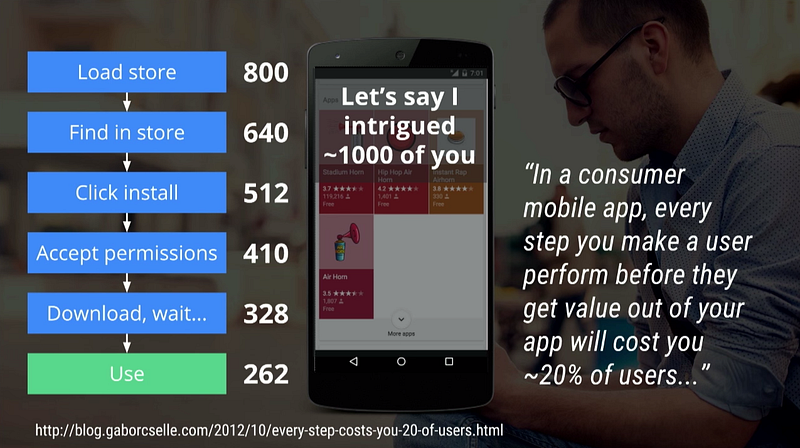
low friction of distribution — if your progressive web app is online, it’s already accessible for Android (and other mobile) users. 65.5% of US smartphone users don’t download any new apps each month. PWAs eliminate the need to go to the app store, search for the app, click Install, wait for the download, then open the app (until Android Instant Appslaunch). Each of these steps loses 20% of the potential users.
discoverability — content in progressive web apps can easily be found by search engines but a content-centric native app like StackOverflow won’t show among app store search results for content that it does offer access to, such as “pwa vs. native”. This is a problem for communities like Reddit, which can’t expose their numerous sub-communities to the app store as individual “apps”.
linkability — any page/screen can have a direct link, which can be shared easily
bookmarkability — save that link to access an app’s view directly
always fresh — no need to go through the app store approval process to push updates
universal access — not subject by app stores sometimes arbitrary policiesor (unintended)geographic restrictions
large data savings, extremely important in emerging markets with expensive and/or slow Internet access. For example, e-commerce website Konga cut data usage by 92% for the first load by migrating to a PWA.
Conclusion
so conclusion is thatif you already have a product, you already have an app, a web presence, or both, and you should improve both. If you don’t have a product, then if you have the resources to build native Android + native iOS + web apps, and keep them in sync, go for it. Otherwise, choosing tobuild PWA firstis a no-brainer in most cases:
If you target the Next Billion Users, PWAs are the way to go. Android users are the majority, and data is expensive.
If you have desktop users, build a PWA.
If you don’t need Android-specific native features (see the comparison above), build just a PWA (which will cover mobile web and Android), and maybe a native iOS app. Building a native Android app isn’t worth it because it won’t help you on the iOS front anyway.but now IOS is adapting pwa-clickhere
Building a PWA can bring up adoption even on iOS: AliExpress (Alibaba’s eBay) saw 82% increase in iOS conversion rate after building a PWA.
Traditionally, you’d have to build
Desktop/mobile web + native Android + native iOS
You can, right now, in most cases, just build
PWA + iOS app
make yourself skill ready for both pwa and native anyone can fine training and certifiction of pwa here.

No comments:
Post a Comment